H2K Helper


Helping Energy Advisors use HOT2000 software

As a Natural Resources Canada registered Energy Advisor and Quality Assurance Specialist, I've spent the last 10 years creating energy simulation models for residential buildings using HOT2000. Along the way I have developed some tools, tips, and tricks to help with the repetitive parts of this work and would like to share these with other Energy Advisors to save us all some time and energy.H2K Shortcuts is a free app I developed and made available on the Microsoft Store. It enables four keyboard shortcuts in HOT2000 for copying, pasting, accessing the Code Editor, and transferring values from SketchUp. Download here to try it out or keep reading to learn more.


How HOT2000 Shortcuts Works

H2K Shortcuts runs quietly in the background, automatically detecting when you're using HOT2000 and enabling shortcuts that make common tasks instant:

Ctrl+C (Copy) - Finally works in HOT2000! This universally-known shortcut has never functioned properly in the software. H2K Shortcuts fixes this and makes it even simpler to use in HOT2000—it copies all text from your selected textbox without needing to highlight anything first.

Ctrl+V (Paste) - Another basic shortcut that mysteriously doesn't work in HOT2000. Now it does.
Ctrl+E (Code Editor) - Instantly opens the Code Editor for whatever construction detail you have selected—walls, windows, ceilings, and more. No more carefully clicking the dropdown menu while holding down the control key.

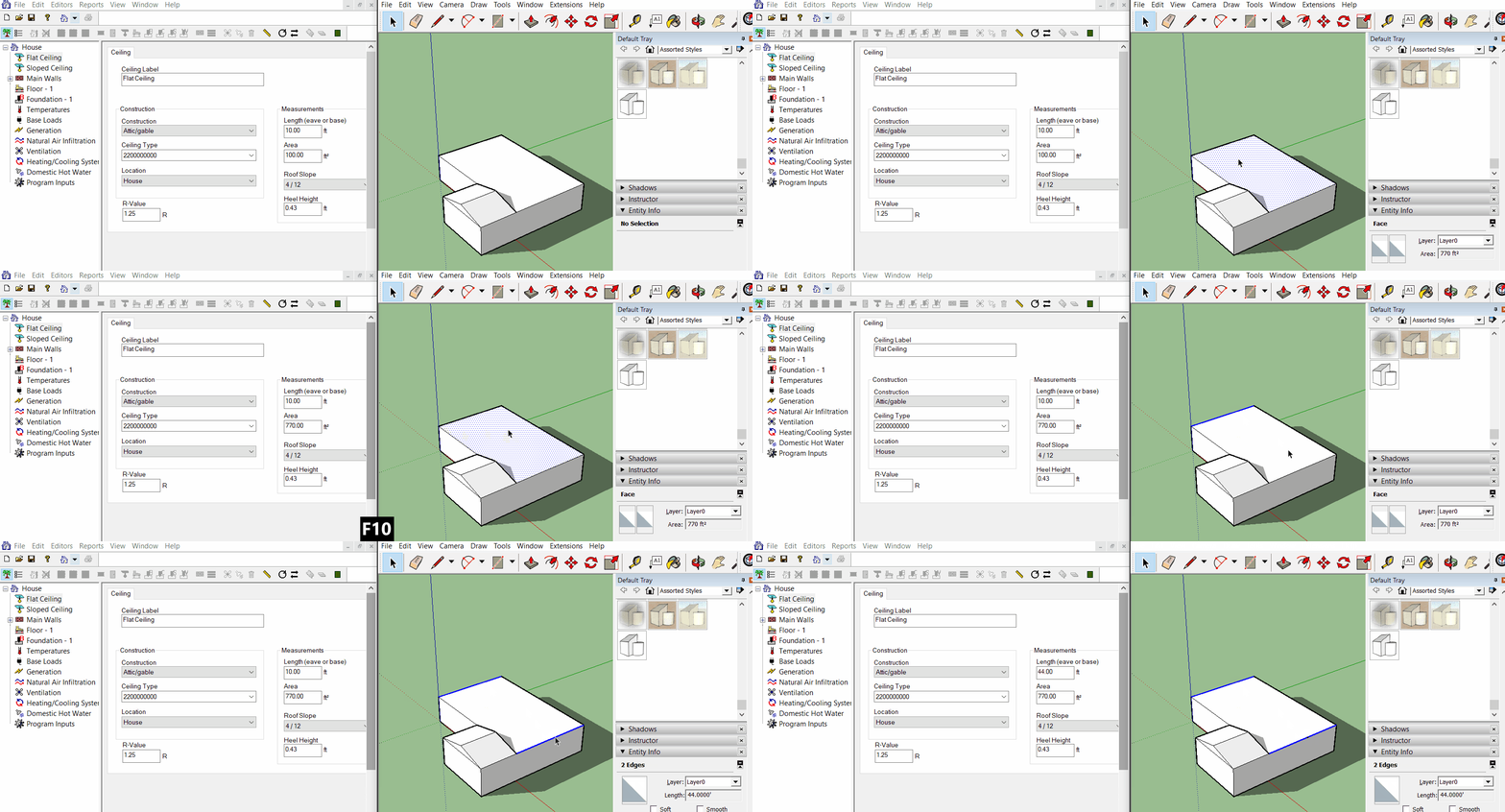
F10 (SketchUp Transfer) - Perfect for users who work with SketchUp Make 2017 to calculate geometry. This smart shortcut automatically detects whether you have an area or perimeter selected in SketchUp, then finds the corresponding textbox open in HOT2000 and transfers the value directly. No more looking back and forth between programs to manually type values into HOT2000. See gif below for a demonstration of this feature.
Contact me at [email protected] for questions and comments.


Privacy Policy for H2K Shortcuts
Effective Date: June 2, 2025
H2K Shortcuts is a free utility application designed to provide keyboard shortcuts and automation for HOT2000 software users. This privacy policy explains how we handle your information when you use our application.Information We Collect:
-We do not collect, store, or transmit any personal information or user data.
H2K Shortcuts operates entirely locally on your device and does not:
-Collect personal information.
-Store user data.
-Transmit data to external servers.
-Track user behavior.
-Access files outside of its intended function.
H2K Shortcuts functions as an automation tool that:
-Monitors for specific keyboard shortcuts when active.
-Sends automated keystrokes to HOT2000 software.
-Operates entirely within your local system environment.
The application requires administrative privileges to function properly because:
-It needs to create system-wide keyboard shortcuts.
-It must interact with other applications (HOT2000) on your system.
-Windows security requires elevated permissions for automation tools.
This administrative access is used solely for the app's intended automation functionality and does not enable any data collection or transmission.Since no data is collected or stored by H2K Shortcuts, there are no data security concerns related to personal information. The app operates in isolation on your local machine.H2K Shortcuts does not integrate with or transmit data to any third-party services, analytics platforms, or external servers.We may update this privacy policy from time to time. Any changes will be reflected in the "Effective Date" of this policy. Continued use of the application after policy updates constitutes acceptance of the revised policy.If you have questions about this privacy policy or H2K Shortcuts, please contact us at:
Email: [email protected]
Children's Privacy
H2K Shortcuts does not knowingly collect information from children under 13 years of age, as it does not collect any personal information from users of any age.
Your Rights
Since we do not collect personal data, there is no personal information to access, modify, or delete. The app's functionality is entirely local to your device.